
11. nodaļa
Privacy and GDPR
Consent, tracking consent, subscriber rights, reconfirmation and retention.
Semantyca is built to help you demonstrate compliance with the GDPR, the ePrivacy rules on e-mail tracking and common anti-spam law. The Privacy and consent screen brings the relevant settings, figures and tools together.
The Privacy and consent screen
Open Components → Semantyca → Privacy and consent.
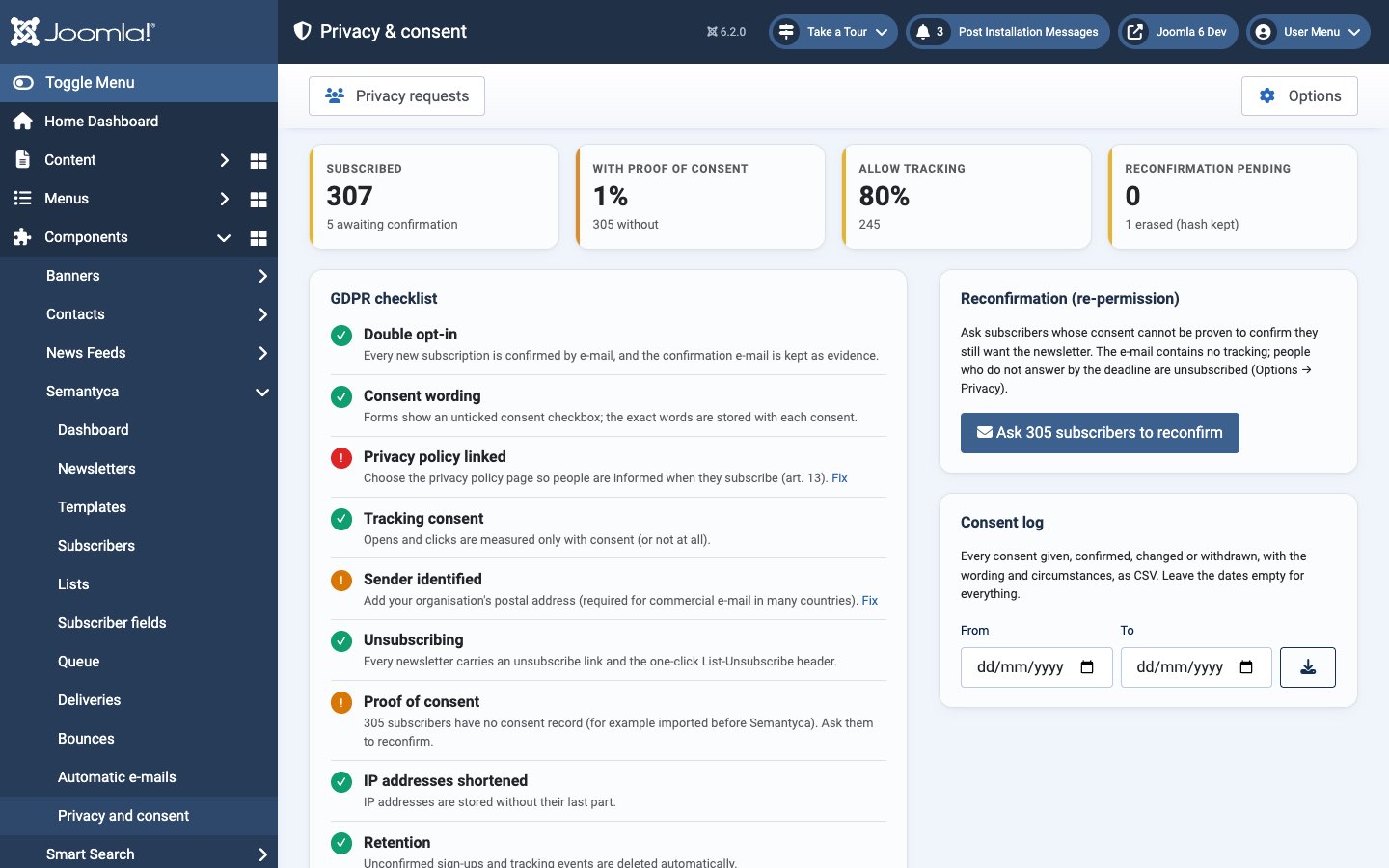
- Figures
- Subscribed (and how many are awaiting confirmation), With proof of consent, Allow tracking and Reconfirmation pending (with the number of erased addresses kept as a hash).
- GDPR checklist
- Each item is marked in order, attention or action needed; Fix opens the relevant setting. It covers double opt-in, consent wording, privacy policy link, tracking consent, sender identification, unsubscribing, proof of consent, IP shortening, retention, self-service rights and Joomla privacy requests.
- Reconfirmation (re-permission)
- Asks subscribers without a consent record to confirm. See Reconfirmation.
- Consent log
- Downloads every consent given, confirmed, changed or withdrawn, with wording and circumstances, as CSV. Enter From and To dates, or leave them empty for everything.
- Text for your privacy policy
- A starting point for the newsletter section of your privacy policy, written from your current settings. Review it with your legal adviser before publishing.
Privacy requests in the toolbar opens Joomla's privacy request manager.
Consent and proof
- Consent checkbox. Every form shows an unticked, required checkbox with your Consent text (Options → Subscription). Newsletter choices are unticked by default.
- Double opt-in. With the default Required for every list (recommended), new subscribers receive a confirmation e-mail. The link opens a page with a Confirm my subscription button, so link scanners cannot confirm on someone's behalf. Lists added later through a public form also wait for confirmation.
- Consent ledger. Every consent requested, confirmed, changed or withdrawn is stored with the exact wording shown, the privacy policy in force, the page, the date and the shortened IP address. The double opt-in e-mail is kept word for word.
- Information. Your privacy policy (Privacy policy or Privacy policy address) is linked from every form, automatic e-mail and the newsletter footer. Your Postal address identifies the sender.
- Age confirmation. Optionally, forms show an additional required checkbox, for example "I am at least 16 years old."
- Imports. A legal basis and evidence note are required and stored with each imported subscriber.
Tracking consent
Tracking pixels and tracked links read information from the recipient's device, which requires consent in the EU. Options → Subscription → Open and click tracking offers:
| Setting | Effect |
|---|---|
| Only with consent (EU) (default) | Forms show an optional, unticked tracking checkbox with your Tracking consent text. Only people who tick it are measured. Others give at most a deliverability signal (the day of their last open, nothing else) if Deliverability signal without consent is on. |
| Always (outside the EU only) | Everyone is tracked. |
| Off | No one is tracked. |
Subscribers can change their choice on the manage-subscription page. Withdrawing consent also stops older e-mails from reporting.
Subscriber rights
- Unsubscribe. Every newsletter has an unsubscribe link and a one-click unsubscribe header. People can leave one newsletter or all of them.
- Self-service. Through the personal link in every e-mail, subscribers change their details and lists, download their data as JSON and, if Subscribers can delete their data is on, delete it.
- Requests to you. Use the subscriber's Privacy & consent actions, or Joomla's Privacy component: the Privacy - Semantyca plugin includes Semantyca data in exports and removes it on request.
- Never re-added. Erased addresses are kept only as a SHA-256 hash, so imports skip them. Subscribing again themselves counts as new consent.
Reconfirmation
When you cannot prove consent, for example for people imported from an older system, ask them to reconfirm. Silence is not consent: people who do not answer by the deadline are unsubscribed.
- Check Reconfirmation deadline and Unsubscribe if not reconfirmed in Options → Privacy.
- On Privacy and consent, click Ask … subscribers to reconfirm and confirm. To ask specific people instead, select them on Subscribers and click Ask to reconfirm.
- Follow the replies with the filter - Consent - → Reconfirmation pending on the Subscribers screen.
The reconfirmation e-mail contains no tracking. Very large audiences are processed in portions; the message tells you how many remain, and you run it again to continue.
Retention
Set how long data is kept in Options → Privacy: unconfirmed sign-ups, tracking events, unsubscribed people and records of withdrawn consent. The daily housekeeping task applies these periods. IP addresses are shortened by default.
Atjaunināts 16 novembris 2026