
13. nodaļa
Options
Every setting in Semantyca's Options, tab by tab, and the permissions.
Semantyca's settings are in Components → Semantyca → Options (the Options button in the toolbar of any Semantyca screen). This chapter lists every tab; default values are given in brackets.
Sender
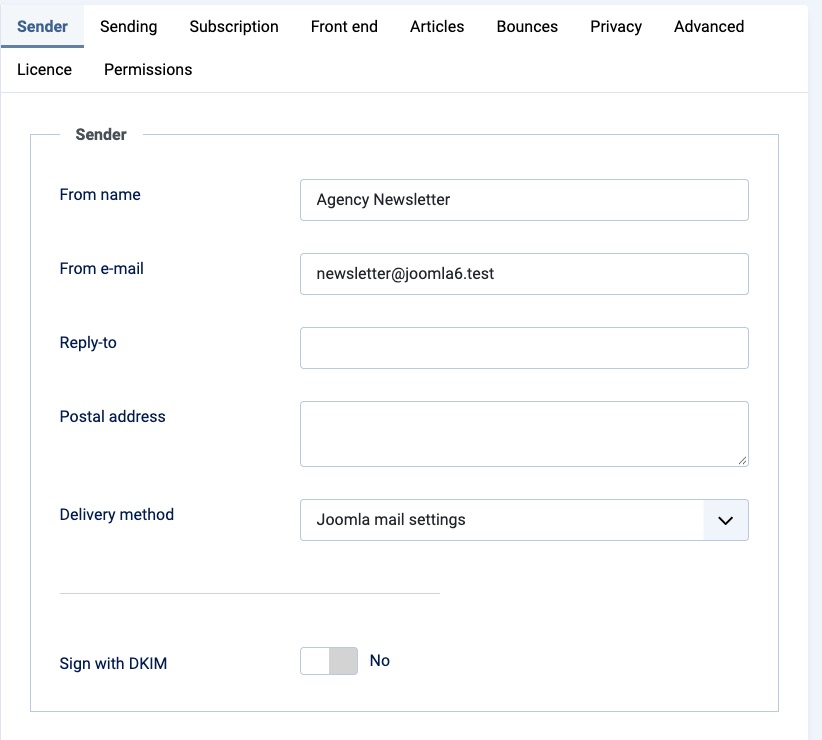
| Option | Description |
|---|---|
| From name | Sender name. Empty = the site's From name (Global Configuration). |
| From e-mail | Sender address. Use an address on your own domain. Empty = the site's From address. |
| Reply-to | Optional address for replies. |
| Postal address | Organisation name and postal address. Available as {{ sender_address }} and added to automatic e-mails. Commercial e-mail must identify the sender. |
| Delivery method | Joomla mail settings (default) or Dedicated SMTP server, for example a transactional mail provider. The SMTP option shows SMTP host, SMTP port (587), Encryption (None, SSL/TLS, STARTTLS), Authentication, Username and Password. |
| Sign with DKIM | Only needed when your mail server does not sign outgoing mail. Enter DKIM domain, DKIM selector (semantyca), the PEM-encoded Private key and, if any, the Key passphrase. Publish the matching public key as a TXT record at selector._domainkey.domain. |
Sending
| Option | Description |
|---|---|
| Batch size | Messages per batch (50). With the scheduler running every minute, several batches are sent per run. |
| Maximum per hour | Respect your provider's limits (0 = unlimited). |
| Pause between messages (ms) | Slows sending for servers that throttle bursts (0). |
| Send only from … until | Optional daily sending window in the site time zone (Any time). |
| Attempts per message | How often a failing message is tried (3). |
| Retry after (minutes) | Delay before the next attempt (15). |
| Track opens / Track clicks | Default for new newsletters (Yes). Consent rules still apply. |
| Add UTM parameters | Appends utm_source=newsletter, utm_medium=email and utm_campaign to tracked links (No). |
| Footer | Footer appended to newsletters. Merge tags such as {{ unsubscribe_url }}, {{ manage_url }} and {{ list_names }} work here. |
| Add footer | Automatically (only when the newsletter has no unsubscribe link of its own), Always or Never. |
Subscription
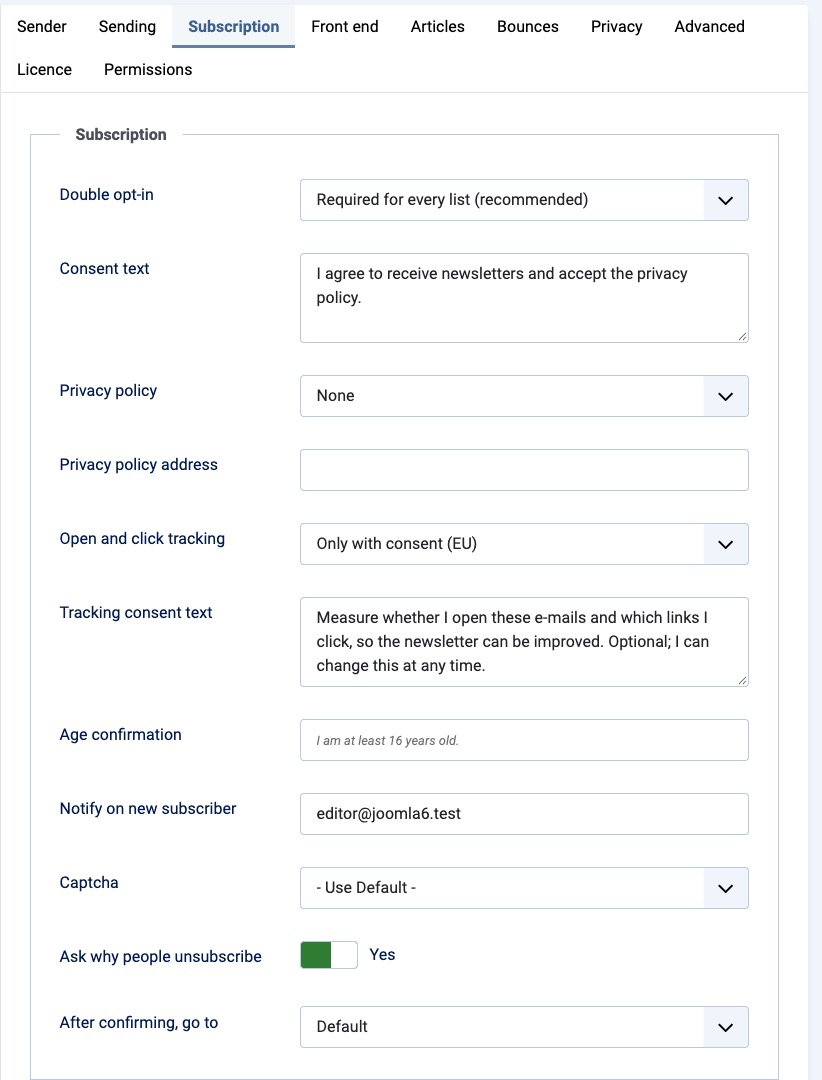
| Option | Description |
|---|---|
| Double opt-in | Required for every list (recommended), As set on each list, or Off (single opt-in, not recommended in the EU). |
| Consent text | Shown next to the unticked, required consent checkbox on every form and stored with each consent. Say what people will receive and that they can unsubscribe at any time. |
| Privacy policy | Menu item of your privacy policy, linked from forms, automatic e-mails and the footer. |
| Privacy policy address | Use instead when the policy is not a menu item on this site. |
| Open and click tracking | Only with consent (EU), Always (outside the EU only) or Off. See Tracking consent. |
| Tracking consent text | Text of the optional tracking checkbox. |
| Age confirmation | When filled in, forms show it as an additional required checkbox. |
| Notify on new subscriber | Address that receives the admin notifications. |
| Captcha | A Joomla captcha plugin for the forms. |
| Ask why people unsubscribe | Shows the optional reason on the unsubscribe page (Yes). |
| After confirming, go to | Optional menu item shown after someone confirms their subscription. |
Front end
| Option | Description |
|---|---|
| Load Semantyca stylesheet | A light default look that only fills in what your template does not style (Yes). |
| Subscribers can delete their data | Shows Delete my data on the manage-subscription page (Yes). Statistics keep anonymous counts. |
Articles
| Option | Description |
|---|---|
| Look back (days) | The article picker offers articles published within this period (365). |
| Only from categories | Limit the picker to these categories. Empty = every category. |
| Article links | Joomla router (SEF), or Custom pattern for sites where articles are shown by another component. The Link pattern accepts {id}, {alias}, {catid} and {catalias}. |
Bounces
| Option | Description |
|---|---|
| Bounce address | Mailbox that receives delivery failures (Return-Path). |
| Per-recipient return path (VERP) | Matches every bounce to the exact message (Yes). The mailbox must accept plus-addressing. |
| Read mailbox via | Don't read a mailbox, IMAP or POP3. |
| Server, Port, Encryption, Verify certificate | Mailbox connection (port 993, SSL/TLS, certificate verified). |
| Username, Password | Mailbox login. |
| Folder | IMAP folder to read (INBOX). |
| Messages per run | Maximum messages read per run (200). |
| Delete from mailbox | Recognised messages (default), All messages read or Nothing. |
| Soft bounces before suppressing | Temporary failures suppress an address only after this many (3) … |
| Soft bounce window (days) | … within this period (30). |
Privacy
Periods are in days; 0 means keep.
| Option | Description |
|---|---|
| Anonymise IP addresses | Store IP addresses without their last part in consent records and tracking events (Yes). |
| Deliverability signal without consent | For subscribers who did not allow tracking, record only the day of their last open (Yes). Shown with tracking Only with consent (EU). |
| Reconfirmation deadline | Days a subscriber has to answer a reconfirmation request (30). |
| Unsubscribe if not reconfirmed | Unsubscribe those who did not reconfirm by the deadline (Yes). |
| Delete unconfirmed after (days) | Remove sign-ups that were never confirmed (30). |
| Delete unsubscribed people after | Erase people who unsubscribed this many days ago; only a hash is kept (0). |
| Keep tracking events (days) | Delete individual opens and clicks older than this; newsletter totals are kept (730). |
| Keep consent records of current subscribers | Records of withdrawn consent are deleted after this many days (1095). Records of current subscribers are always kept. |
Advanced
Public site URL is used for links in e-mails sent from the command line or scheduler. It is filled in automatically on first use; correct it if your site moves.
Licence
Licence key enables updates and support. See Enter your licence key.
Permissions
Besides Joomla's standard permissions, Semantyca adds three actions:
| Action | Allows |
|---|---|
| Send newsletters | Sending tests, starting, scheduling, pausing and stopping newsletters. |
| Edit template code | Creating, importing and editing template code. Templates contain executable EJS; give this only to trusted users. |
| Export subscribers | Downloading subscriber data as CSV. |
A typical editorial set-up: editors may create and edit newsletters but not send; a responsible person holds Send newsletters; only the site builder holds Edit template code.
Atjaunināts 16 novembris 2026