
10. nodaļa
Bounces and deliverability
Bounce mailbox, bounce rules, the suppression list and deliverability tips.
Undeliverable addresses and spam complaints hurt your sender reputation. Semantyca reads a bounce mailbox, classifies what comes back and stops sending to addresses that no longer work.
Set up bounce handling
- Create a mailbox for bounces, for example
bounces@yourdomain.com. For the recommended VERP option it must accept plus-addressing (bounces+anything@yourdomain.com). - Open Options → Bounces and enter it as Bounce address. It is used as the Return-Path of every newsletter.
- Leave Per-recipient return path (VERP) on, so each bounce is matched to the exact message even when the report is incomplete.
- Under Read mailbox via choose IMAP or POP3 and enter Server, Port, Encryption, Username, Password and, for IMAP, the Folder. Save.
- Open Components → Semantyca → Bounces and click Test connection.
From then on the task Semantyca: process bounces reads the mailbox every 15 minutes. All settings are described in Options → Bounces.
The Bounces screen
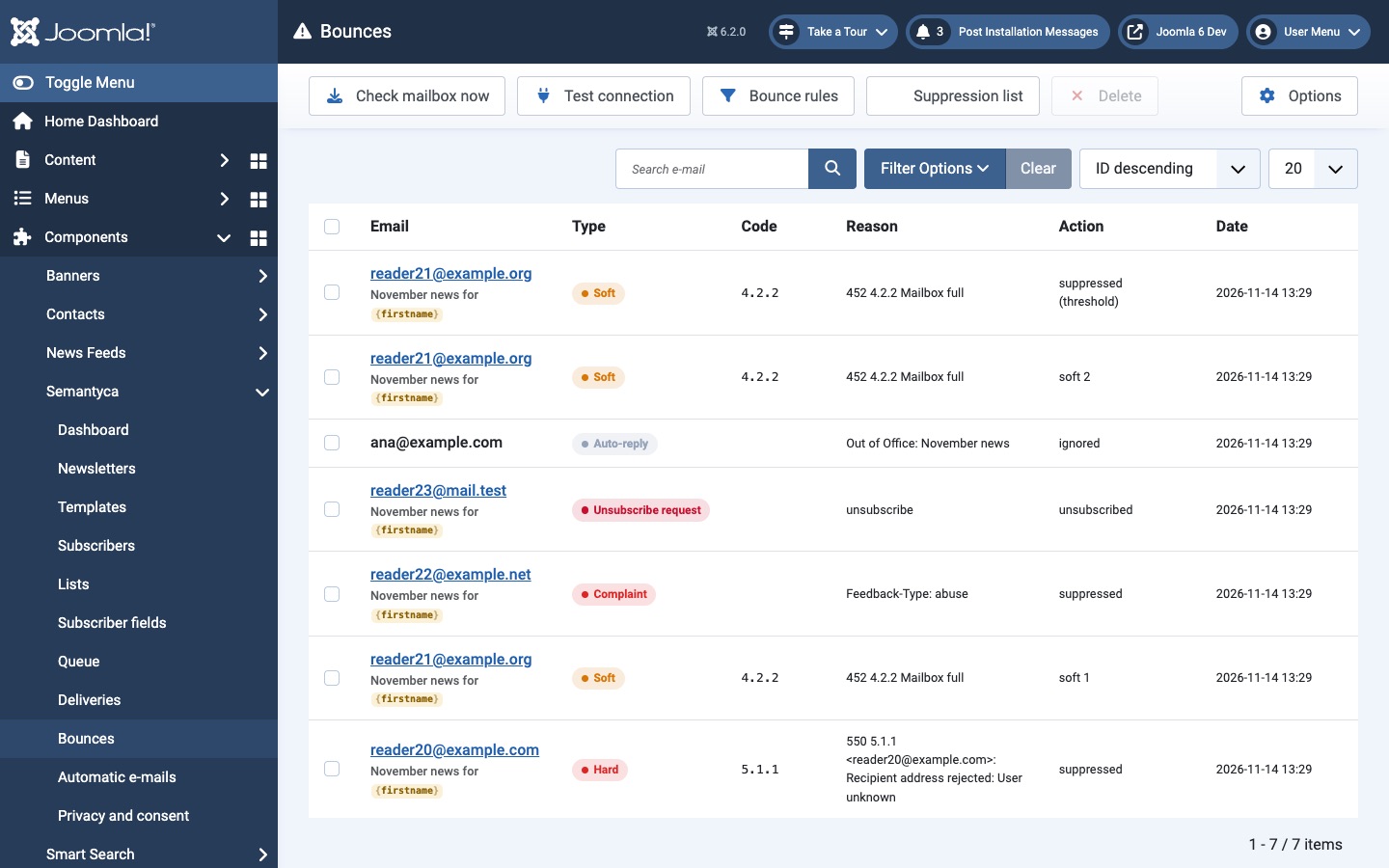
- Each row shows the address and newsletter, the Type, the SMTP status Code, the Reason from the report and the Action taken.
- Check mailbox now reads the mailbox immediately and reports what it found.
- Test connection checks the mailbox settings and tells you how many messages are waiting.
- Bounce rules and Suppression list open the screens described below.
Bounce types and actions
| Type | Example | Action |
|---|---|---|
| Hard | User unknown, domain not found | Address suppressed immediately; subscriber set to Bounced. |
| Soft | Mailbox full, temporary failure | Counted. The address is suppressed only after Soft bounces before suppressing within Soft bounce window (days). |
| Complaint | Spam report through a feedback loop | Address suppressed; subscriber set to Complained. |
| Unsubscribe request | Reply asking to unsubscribe | Subscriber unsubscribed. |
| Auto-reply, Ignore | Out of office | Ignored. |
| Unrecognised | Anything else | Recorded only. |
Standard delivery reports (DSN, RFC 3464) and spam complaints (ARF, RFC 5965) are understood automatically. Everything else is matched against the bounce rules.
Bounce rules
Click Bounce rules on the Bounces screen. Semantyca comes with rules for common cases (mailbox full, user unknown, out of office and more). Rules are applied top to bottom; the first match wins.
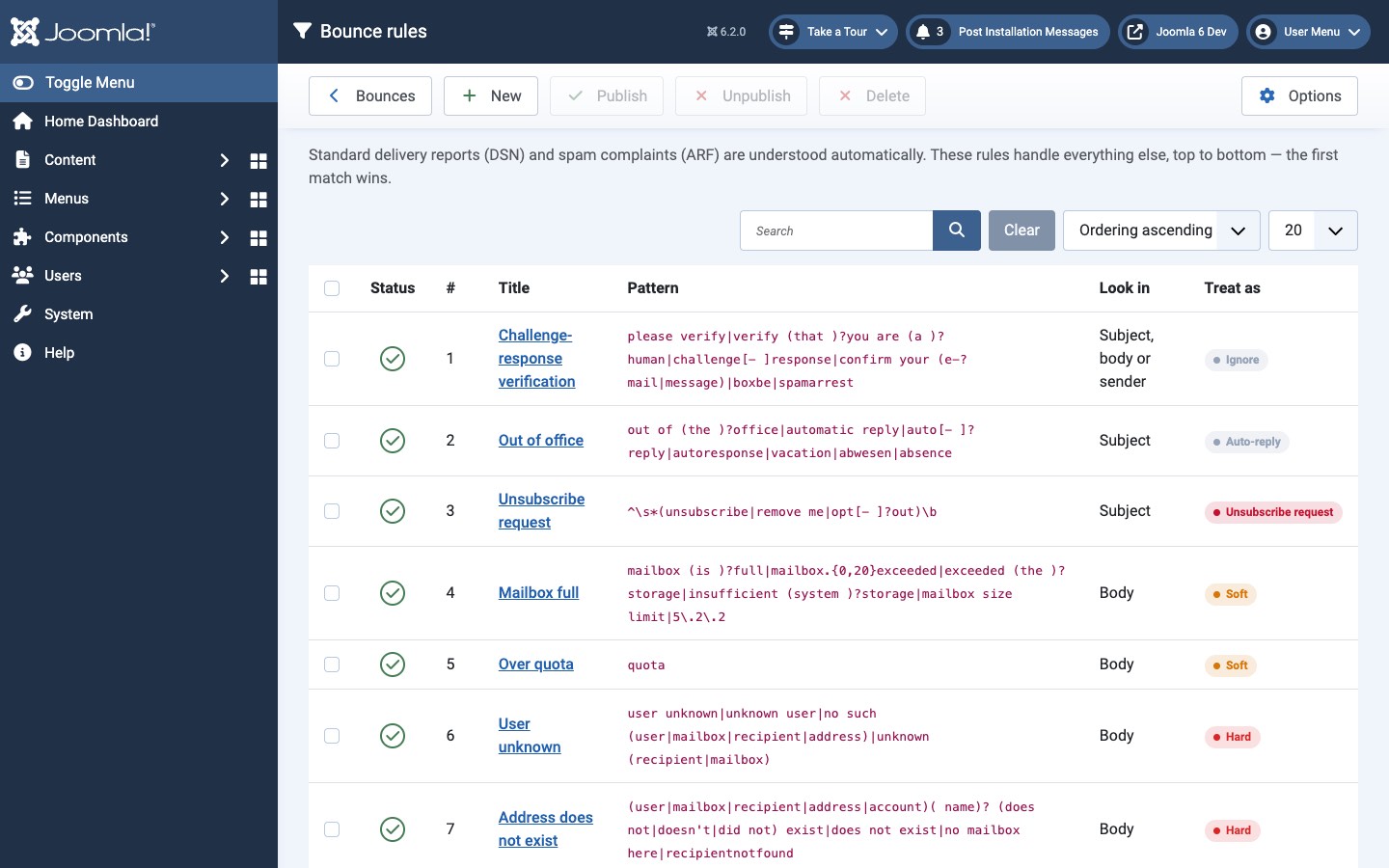
To add a rule, click New and fill in:
- Title
- A name for the rule.
- Look in
- Subject, body or sender, or only Subject, Body or Sender.
- Pattern
- A regular expression, matched case-insensitively, without delimiters. Example:
mailbox (is )?full|quota exceeded. - Treat as
- The bounce type to assign (see the table above).
Unpublish a rule to disable it without deleting it.
Suppression list
Addresses on the suppression list never receive newsletters and cannot be imported. Hard bounces and spam complaints are added automatically. Open it with Suppression list on the Bounces screen.
- To block an address yourself, click New (Suppress an address), enter the Email, choose a Reason (Manual, Hard bounce or Spam complaint) and an optional Note.
- To lift a suppression, tick the address and click Delete. The address may then receive newsletters again, so do this only when you know it works.
Deliverability checklist
- Send from an address on your own domain, never from a free-mail address.
- Publish SPF and DKIM for the From domain. If your mail server does not sign messages, enable Sign with DKIM in Options → Sender.
- Configure a bounce mailbox so dead addresses are removed.
- Keep the unsubscribe link in every template. Semantyca adds the one-click
List-Unsubscribeheader (RFC 8058) that Gmail, Yahoo and Outlook require from bulk senders. - Respect your provider's limits with Maximum per hour.
- Read the pre-send checks on the review screen before every send.
Atjaunināts 16 novembris 2026