
Chapter 2
Installation and licence
Requirements, installing and updating the package, and entering your licence key.
Semantyca NM is installed as a single Joomla package. This page covers requirements, installation, updates, the licence key and removal.
Requirements
- Joomla 6.0 or newer
- PHP 8.3 or newer
- MySQL 8 or MariaDB 10.6 or newer
- A working mail set-up: Joomla's mail settings (System → Global Configuration → Server → Mail) or a dedicated SMTP server entered in Semantyca's own options
- Optional: a mailbox reachable over IMAP or POP3 for bounce processing
Install the package
- Download the installation package
pkg_semantyca-<version>.zipfrom your account on absolute.lv. - In the Joomla administrator open System → Install → Extensions.
- Drop the zip file on the Upload Package File tab (or browse for it) and wait for the success message.
- Open Components → Semantyca. Continue with Getting started.
What the package installs
| Extension | Purpose |
|---|---|
| Semantyca (component) | Administrator screens, front-end pages and the REST API |
| Task - Semantyca | Scheduled tasks: send newsletters, process bounces, housekeeping |
| Console - Semantyca | Command-line commands semantyca:queue, semantyca:bounces, semantyca:housekeeping |
| User - Semantyca | Keeps subscribers in sync with Joomla accounts; optional newsletter checkbox on registration |
| Privacy - Semantyca | Includes newsletter data in Joomla privacy exports and removes it on request |
| Web Services - Semantyca | REST API routes under /api/index.php/v1/semantyca/ |
| Semantyca - Subscribe (module) | Sign-up form for any module position |
All plugins are enabled and the three scheduled tasks (Semantyca: send newsletters, Semantyca: process bounces, Semantyca: housekeeping) are created automatically. On a first installation Semantyca also adds two starter templates (Article digest and Announcement) and a public list called Newsletter, so you can try the composer and the subscription form straight away.
Enter your licence key
Every feature works without a licence key. The key gives you updates and support.
- Open Components → Semantyca and click Options in the toolbar.
- Select the Licence tab.
- Paste the key from your Absolute Management account into Licence key.
- Click Save & Close.
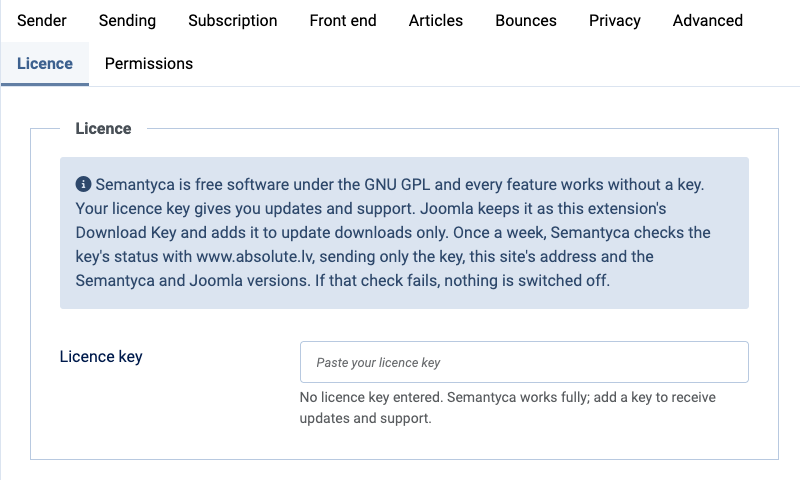
Joomla stores the key as the extension's Download Key, so you can also see or change it under System → Update Sites; both places hold the same value. To remove the key, clear the field and save.
Once a week Semantyca checks the key's status with www.absolute.lv, sending only the key, the site address and the Semantyca and Joomla versions. If the check fails, nothing is switched off. The possible statuses are:
| Message | Meaning |
|---|---|
| No licence key entered. Semantyca works fully; add a key to receive updates and support. | No key stored. |
| Updates and support are active (until date). | The key is valid. |
| This licence expired on date. | Semantyca keeps working; renew to receive updates and support again. |
| The update server does not recognise this licence key. | Check that the key was copied in full. |
| Not checked yet / could not be checked | The first check has not run, or the server was unreachable. Updates are still requested with your key. |
Update Semantyca
Semantyca uses Joomla's standard update system.
- Make sure your licence key is entered (see above).
- Open System → Update → Extensions and click Check for Updates.
- Select Semantyca and click Update.
You can also install a newer package over the existing one through System → Install → Extensions. Your data, templates and settings are kept.
Uninstall
Uninstall the package Semantyca under System → Manage → Extensions (filter by type Package). This removes all Semantyca extensions.
Last updated 16 November 2026